
Make a bot
Bot Builder
Bot Builder makes a bot from simple rules, like "when someone says good morning, reply". There's no code and nothing to install: it's part of the Roar desktop app.
What you need: the Roar desktop app for Windows or Linux, and Roar Plus (Bot Builder is a Plus perk). You also need to be an admin, or have Manage Server, in the servers you add the bot to.
How it works
A Bot Builder bot is a real bot, with its own name, picture and BOT tag. You give it rules. Each rule waits for something (a command, a word, a new member, a timer) and then does something (replies, reacts, gives a role, posts).
The bot runs inside your Roar app, on your computer. It's online while Roar is open and signed in, and goes offline when you close Roar. For a bot that's always on, see when to move to code.
Make a bot
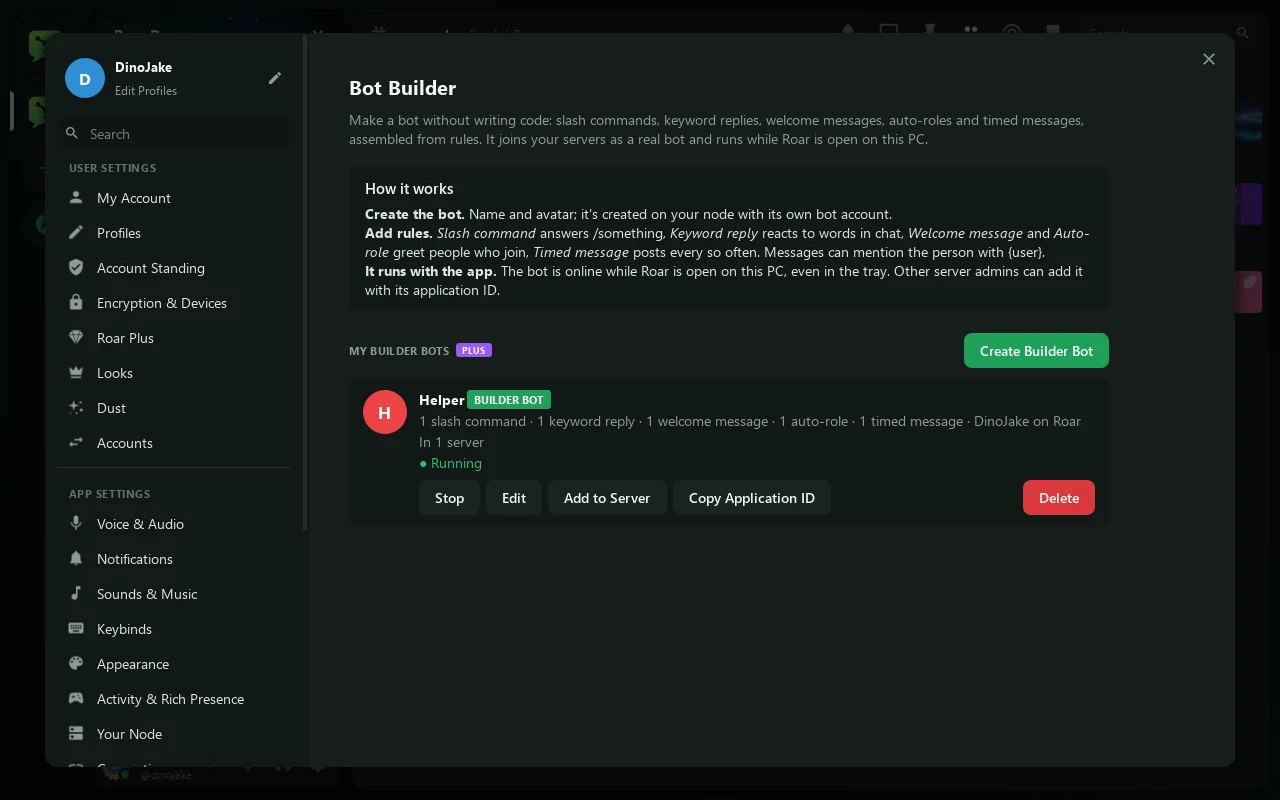
- Open Bot BuilderIn the desktop app, open User Settings → Bot Builder (under Advanced).
- Create itPress Create Builder Bot, give it a name (and a picture if you like), and press Create Bot. Its account is made on your node straight away.
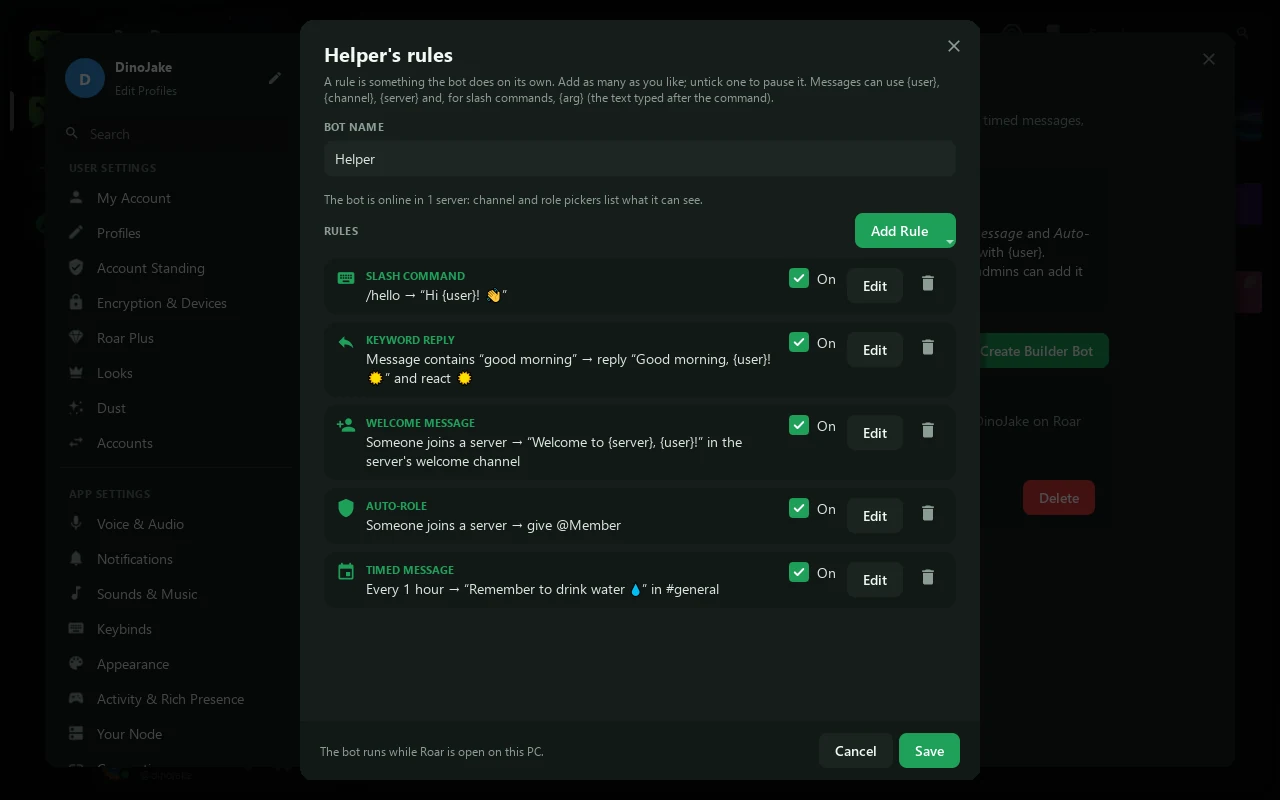
- Add rulesPress Add Rule, pick what kind of rule it is and fill it in. Add as many as you like, then press Save. Untick a rule's On box to pause it.
- Add it to serversBack on the Bot Builder page, press Add to Server on your bot. Other admins can add it too, with Copy Application ID and Server Settings → Bots.
- DoneThe bot is online while Roar is open, even when it's down in the tray. Stop and Start turn it off and on; Edit changes its rules.
The rules
| Rule | When | You fill in |
|---|---|---|
| Slash command | Someone uses /yourcommand | Command, Description and Answer. Tick Only the person who used the command sees the answer to keep it private. |
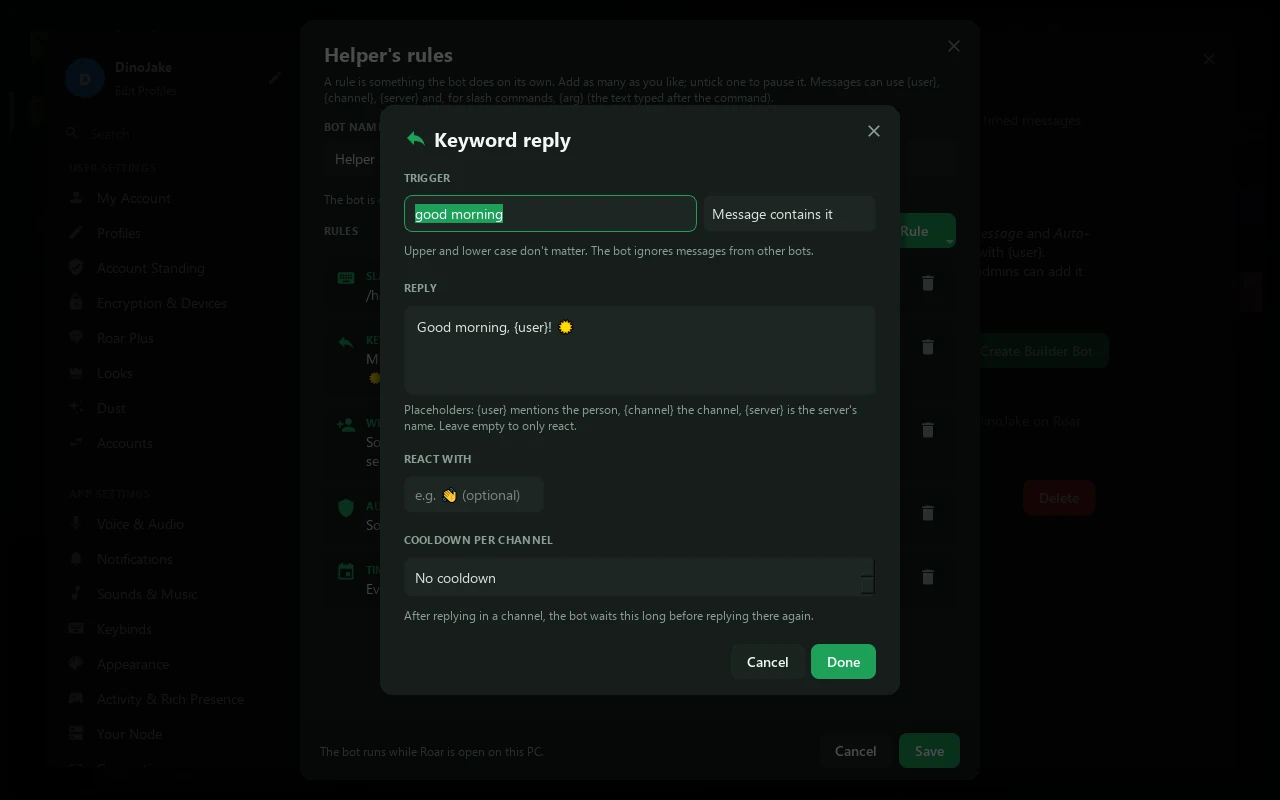
| Keyword reply | A message contains, starts with or is exactly your words (capitals don't matter) | Trigger, Reply (leave it empty to only react), React with an emoji, and a Cooldown per channel so it doesn't answer too often. |
| Welcome message | Someone joins the server | Post in channel (empty: the server's welcome channel) and Message. Tick Also send it to the person as a direct message to DM them too. |
| Auto-role | Someone joins the server | Give role. |
| Timed message | Every few minutes or hours (up to once a week) | Post in channel, Message and How often. |
Channels and roles go by name, in every server the bot is in: once the bot is online, the rule editor lists the ones it can see. So a welcome rule for welcome works in any of your servers that has a #welcome channel.
Fill-ins
Put these in any message and the bot swaps them for the real thing:
| Write | Becomes |
|---|---|
{user} | The person, as a ping |
{channel} | The channel |
{server} | The server's name |
{arg} | In a slash command: what the person typed after it. Using {arg} gives the command a text option. |
An example: a helper bot
Here's a friendly helper for a small server, using all five kinds of rule:
- Slash command
/hello: Hi {user}! 👋 - Keyword reply: when a message contains
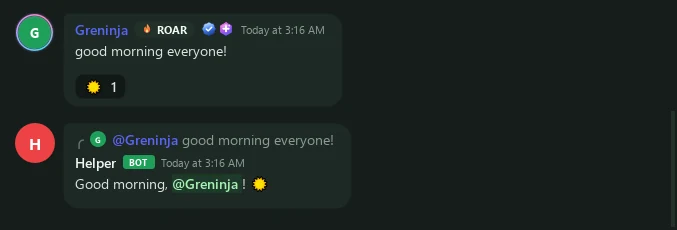
good morning, reply Good morning, {user}! ☀️ and react ☀️, at most once a minute per channel. - Welcome message in
welcome: Welcome to {server}, {user}! Read the rules and say hi. - Auto-role: give everyone who joins the
Memberrole. - Timed message in
general, every 60 minutes: Remember to drink some water 💧
For the auto-role, the bot needs a role with Manage Roles that sits above Member in Server Settings → Roles. A bot starts with only what @everyone can do.
Good to know
- Keep Roar open. The bot only answers while your app runs on that PC. It runs in one copy of Roar at a time.
- It's still a bot account. It shows up on your Developer page too, and it counts towards your 25 bots.
- It ignores other bots, so two bots can't answer each other forever.
When to move to code
Bot Builder covers the everyday jobs. Write your bot with Roar.js when you want:
- a bot that's online all the time, even when your computer is off;
- things rules can't do: games, scores, reading other websites, remembering things, embeds;
- to share the bot's code, or run it for lots of servers.
Everything Bot Builder does fits in a few lines of Roar.js. The helper bot above, as code:
import { Bot } from "roar.js";

const bot = new Bot({ token: process.env.ROAR_TOKEN });

bot.command("hello", "Say hi", (i) => i.reply(`Hi ${i.user}! 👋`));

const lastMorning = new Map(); // channel → time, for the one-minute cooldown
bot.on("message", async (msg) => {
  if (msg.author.isBot || !msg.content.toLowerCase().includes("good morning")) return;
  if (Date.now() - (lastMorning.get(msg.channelId) ?? 0) < 60_000) return;
  lastMorning.set(msg.channelId, Date.now());
  await msg.reply(`Good morning, ${msg.author}! ☀️`);
  await msg.react("☀️");
});

bot.on("memberJoin", async (member) => {
  await member.guild.channel("welcome")?.send(`Welcome to ${member.guild.name}, ${member}! Read the rules and say hi.`);
  await member.addRole("Member");
});

bot.once("ready", () => {
  setInterval(() => {
    for (const guild of bot.guilds.values()) guild.channel("general")?.send("Remember to drink some water 💧");
  }, 60 * 60_000);
});

bot.start();Other bots without code
- Welcomer and Levels are ready-made bots on every node: add them from Server Settings → Bots. More →
- AI Bots (User Settings → AI Bots in the desktop app) turn an AI service you have an account with into a chat bot that answers when it's mentioned. You bring your own key from the AI service, and it runs in your app like a Bot Builder bot.